

 Back
Back Русский
 Английский
Oct 27, 2026
5 Halloween Stream Ideas: From Horror Games to Escape Rooms
You've put a pumpkin on your desk. Now what happens on stream? You don't need an elaborate costume or a room full of guests to make a Halloween show. You could let chat send you through a suspicious door, tell a ghost story together or try to escape a haunted studio.
These five Halloween stream ideas are easy to host on your own. They suit small channels: viewers can join in, but you can keep things moving if everyone would rather watch. The next chance to try one is October 31, 2026.
Which idea sounds like your kind of evening?
| You feel like… | Try | Get ready |
|---|---|---|
| Playing something a little unsettling | A horror game with chat decisions | A familiar game and a few choices |
| Talking by lamplight | A spooky story with two endings | A short story of your own |
| Making something with your hands | A paper-ghost workshop | Paper, a marker and a camera |
| Getting viewers to guess along | Three-clue Halloween trivia | Eight riddle cards |
| Playing detective | A slide-based escape room | Three puzzles and a door code |
1. Let chat make the decisions in a horror game
You're standing at the top of a dark basement staircase. You'd rather stay upstairs, but chat has other ideas. Why not give viewers a few decisions to make? Pick a horror game you know and find places where you can stop to ask: open the door or find another route? Take the flashlight or leave it behind?
One episode and three decision points are enough for a first attempt. Introduce the game, get started and bring viewers in at the first choice. Ask them to type “1” or “2”; you can count replies yourself. Allow about a minute for answers, including stream delay, count one vote per person and explain how you'll break a tie.
If nobody votes, make the choice yourself and talk through your reasoning. After a tense scene, ask who would have stayed upstairs. The game gives you something to talk about without having to reach for an unrelated conversation starter.
You don't need to buy a new release for the occasion. Use a game you already own or a demo whose terms allow streaming. Before the show, check capture, volume and permissions for the game's music. If there's a streamer mode, find out what it actually switches off. A webcam is optional too: you can play with just your voice and commentary.
2. Tell a spooky story and choose the ending together
“The stream was over. The monitor went dark. But someone was still talking in the headphones.” That opening could go in all sorts of directions, especially with viewers helping you along.
Write a short story that takes 5–7 minutes to read and give it two endings. Stop at the crucial moment: does the character answer the voice or take off the headphones? Let chat decide, read the chosen ending and then work out who might have been on the other end.
You don't have to improvise an entire story. Ask viewers for one detail at a time: a town name, a strange object on the desk or the last word of a message. Keep a few answers of your own ready for quiet moments. At the end, read back what you've made together and give it a title.
This is an easy Halloween stream to run without a webcam. A microphone and a still background will do. Music is optional; a pause before the reveal can set the mood on its own. Get permission before reading someone else's story, and collect and review viewer submissions before going live.
3. Give some paper ghosts a home in your streaming space
If horror games aren't your thing, settle in for a craft stream. Make a few paper ghosts, give them faces and names, then decide which one belongs on the monitor and which should haunt the background.
Gather paper, a marker, scissors and tape. Make one example beforehand so you have something to show at the start and compare with the finished result. Position the camera to show your hands and work surface, then record a quick test. An ordinary lamp that makes the details visible will serve you better than atmospheric darkness.
Give chat small decisions as you work: is this ghost grumpy or sleepy? Does it need eyebrows? What's its name? Start with a simple outline, add some personality and finish by showing how the new decor looks in your usual shot. Viewers can craft along even if they don't feel like chatting.
Scrap paper and supplies you already have are enough. You won't need a second camera: show the materials, point your camera at the table and get started. If nobody offers suggestions, make three different characters and choose your own favourite.
4. See who can solve a three-clue Halloween riddle
“I sit by the door. There's a light inside me. Someone carved my smile.” A jack-o'-lantern! That's one way to open a Halloween trivia stream. Mix imaginary monsters with familiar seasonal objects so viewers don't need an encyclopaedic knowledge of horror films to join in.
Prepare eight cards with three clues each, starting vague and getting easier. Your own simple drawings or plain text in a free slide editor will do. Keep the answers and acceptable alternatives on a separate sheet so you aren't debating the rules halfway through a round.
Open with an easy riddle, explain how it works and reveal one clue at a time. If nobody guesses, add another after about half a minute. Once someone solves it, talk about which clue gave it away. Towards the end, invite viewers to set you a riddle of their own.
Let everyone keep their own score: three points for solving it after the first clue, two after the second and one after the third. Agree to play on the honour system. That saves you from judging who answered first across different stream delays, and you don't need prizes. Even one active viewer gives you someone to swap guesses with and work through an overly cryptic clue.
5. Help viewers escape a haunted studio
The door has slammed shut, the stream is still running and the lock code has disappeared. You don't need to build a set for this escape room: the whole place can fit inside a presentation, with you as the host.
Make six slides: the setup, three puzzles, a locked door and the ending. For example, the puzzles lead to a pumpkin, a bat and a ghost. Hide the digits 4, 2 and 7 beside their drawings. A note on the door gives the order: “First what grows, then what flies, then what walks through walls.” Put together 427 and the door opens.
Introduce the “locked” studio, then take viewers hunting for clues. Ask them to explain their guesses: hearing why someone suspects the bat is more interesting than getting a number on its own. Once the code works, reveal the ending and revisit the hidden details. Did anyone spot something everyone else missed?
Prepare two hints for each puzzle. If a couple of minutes pass without progress, help chat along; if they solve it straight away, move on. With a quiet audience, you can narrate the deductions yourself like a detective. A free slide editor, your own drawings and manual slide changes are all you need. Just check on a phone that those hidden digits are readable before you start.
Bring it together for one Halloween stream
You don't need to fit a horror game, a workshop and an escape room into the same evening. Choose the activity you want to host, then add a short warm-up if you'd like a change of pace: a couple of riddles before the ghost story, for example. Around an hour gives you a starting point for your first holiday stream.
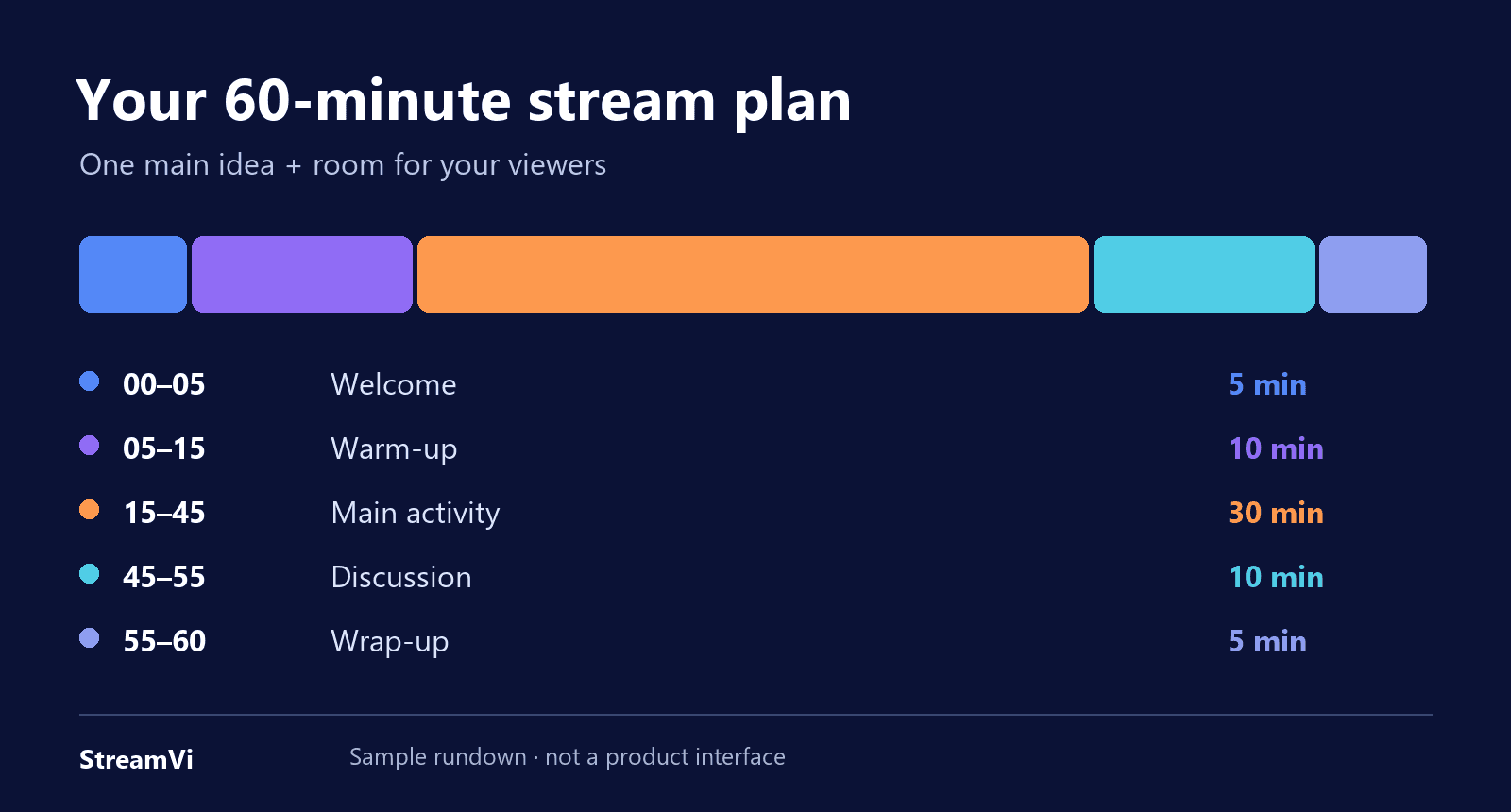
Adjust the timing to fit your format.
If viewers follow you on different platforms, you can send the same holiday show to them through StreamVi. Our guide to multistreaming and connecting OBS covers the first steps. Check the channel and bitrate limits in your project plan before going live.
While viewers choose a door or name a ghost, StreamVi multichat can help you read messages from supported connections in one window. Keep it in your private workspace and count votes manually. Chat depends on the integration and account access: a manual RTMP/SRT video connection doesn't automatically add it. Keep the panel's access-key URL off screen.
What to check before your Halloween stream
- The announcement. Include the date, time and time zone, and tell people what they'll be doing. “October 31, 2026: chat chooses the ending of a spooky story” gives them more to go on than “Halloween special.”
- Your materials. Gather the game, story, cards or slides in one place. Check permissions for third-party text, images and music, and have answers and hints ready.
- Picture and sound. Record a couple of minutes and watch on a phone. Can you hear your voice, read the riddles and see your hands at the table?
- OBS. Check scenes, window capture and your break screen, and turn off personal notifications. If you need different audio in the live show and replay, see our guide to Twitch VOD tracks. Splitting tracks doesn't itself grant music rights.
- Chat. Decide how to count votes and break ties. Have a backup question or answer for quiet moments, and tell viewers how scary the evening will be.
- Your platforms. Run a short test and check audio and video on each viewer page. When multistreaming, allow for delayed replies and check the platforms' simulcasting terms.
After saying goodbye, make sure every broadcast has stopped. Then jot down a few notes: where the conversation took off, which riddle was too difficult and what you'd like to do again. Next Halloween, you'll have an idea you've already made your own.
