Русский
 Английский
Plans
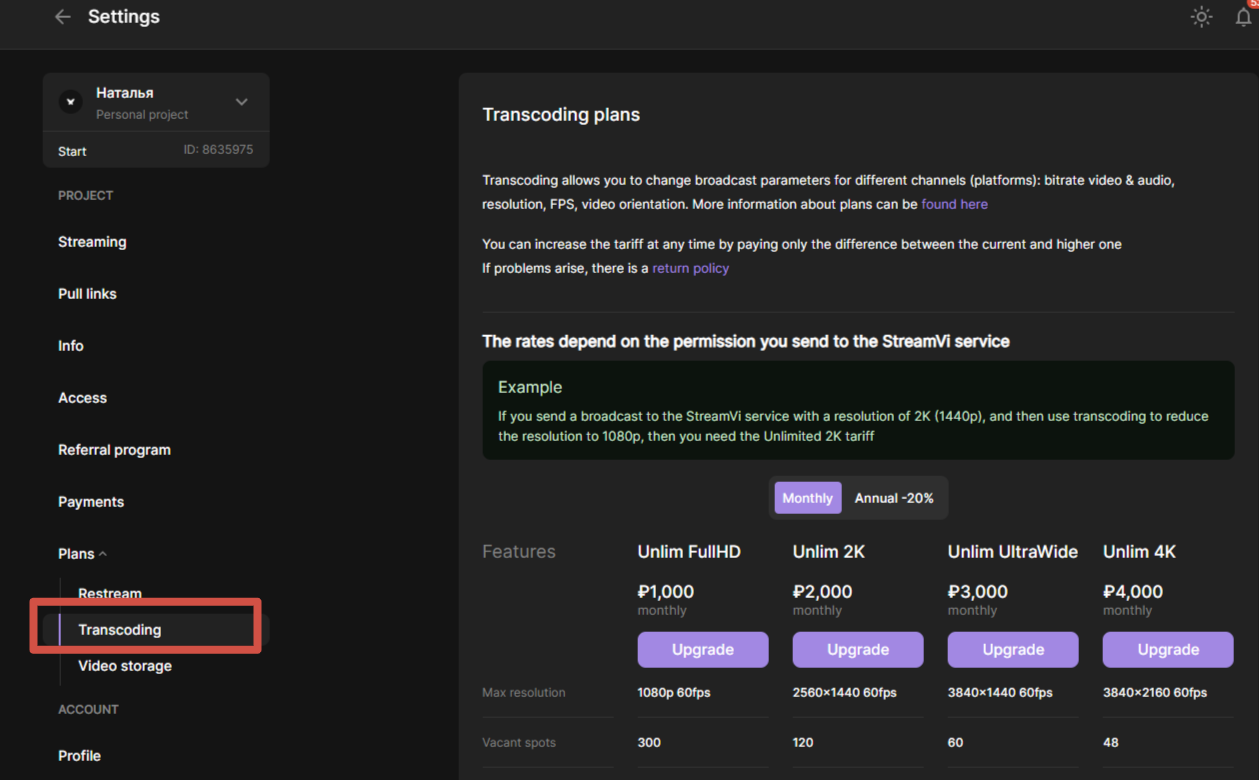
How to choose a transcoding rate
The rates are divided into three options, which depend on the permission you send to the StreamVi service.
For example, if you send a broadcast to a service with a resolution of 1440p, and then use transcoding to reduce the resolution to 1080p, then you need the Unlimited 2K tariff.
When choosing a tariff, you can specify how many streams you need. You can add an unlimited number of channels to a single stream.
One transcoding stream is one change in your broadcast parameters.
Example 1:
- You have an original stream with a resolution of 2K and a bitrate of 40,000 that you want to stream on YouTube and VKontakte
- On Twitch and Trovo, you want to stream 1080p resolution with a bitrate of 6,000
Then you need one transcoding stream, in which you specify the Twitch and Trovo channels.
The broadcast on YouTube and VKontakte will go without transcoding in the original quality.
Example 2:
- You have an original stream with a resolution of 2K and a bitrate of 40,000 that you want to stream on YouTube and VKontakte
- On Twitch, you want to stream 1080p resolution with a bitrate of 6,000
- On Trovo, you want to broadcast 1080p resolution with a bitrate of 10,000
Then you need two transcoding streams.
The broadcast on YouTube and VKontakte will go without transcoding in the original quality.
You can select and activate the desired transcoding tariff in the “Settings” - “Tariffs” - “Transcoding” section