
OAuth
The OAuth integration type suits an external website that needs access to a StreamVi project's data. The user selects a project and grants permissions, and your application uses that access to make API requests.
The method and parameter reference is at dev.streamvi.io. Follow the contract of the selected method. Application settings are under For developers → application → Settings.
SDK Axios and SDK Fetch are available for API requests. If your server already uses Passport, read the library guide and its published version's limitations. GitHub examples show the server application structure; the guide below implements OAuth with state validation and PKCE directly.
Prepare an application
Create a plugin of type OAuth integration, select its required permissions and configure allowed OAuth redirect URLs. The example below needs project:read. The client ID and secret key are available in application settings. Keep the secret and issued tokens on your application server.
The examples use https://example.com/streamvi/callback. Replace it with your own handler and add that same URL to the application settings. All example IDs and tokens are fictional.
Start a connection
Send the user to https://streamvi.io/cabinet/oauth with the parameters below. The Cabinet displays project selection and permission consent.
| Parameter | Value |
|---|---|
client_id | Client ID from application settings |
redirect_uri | Full URL of your callback handler, matching an allowed OAuth redirect URL |
response_type | code |
scope | Required permission codes separated by spaces, for example project:read |
state | A new random string associated with the user's current session in your application |
code_challenge | SHA-256 of code_verifier, encoded as Base64url without = padding |
code_challenge_method | S256 for this PKCE example |
project_id | Optional external project ID. Without it, the user selects a project in the Cabinet |
The following server-side Node.js example creates a URL using PKCE S256. Generate a new state and codeVerifier for each connection.
import { createHash, randomBytes } from 'node:crypto';

function beginOAuth(clientId, redirectUri) {
  const state = randomBytes(32).toString('base64url');
  const codeVerifier = randomBytes(32).toString('base64url');
  const challenge = createHash('sha256').update(codeVerifier).digest('base64url');
  const url = new URL('https://streamvi.io/cabinet/oauth');
  url.search = new URLSearchParams({
    client_id: clientId,
    redirect_uri: redirectUri,
    response_type: 'code',
    scope: 'project:read',
    state,
    code_challenge: challenge,
    code_challenge_method: 'S256',
  }).toString();

  return {
    url: url.href,
    transaction: { clientId, redirectUri, state, codeVerifier },
  };
}
Call beginOAuth with your client ID and callback URL. Store transaction in the user's server-side session, then redirect the browser to url. Set an expiry for this record and use it for one connection only. The URL contains code_challenge; the original codeVerifier remains on your server until code exchange.
User authorization
The application starts authorization. In the Cabinet, the user selects an available project and clicks Continue.
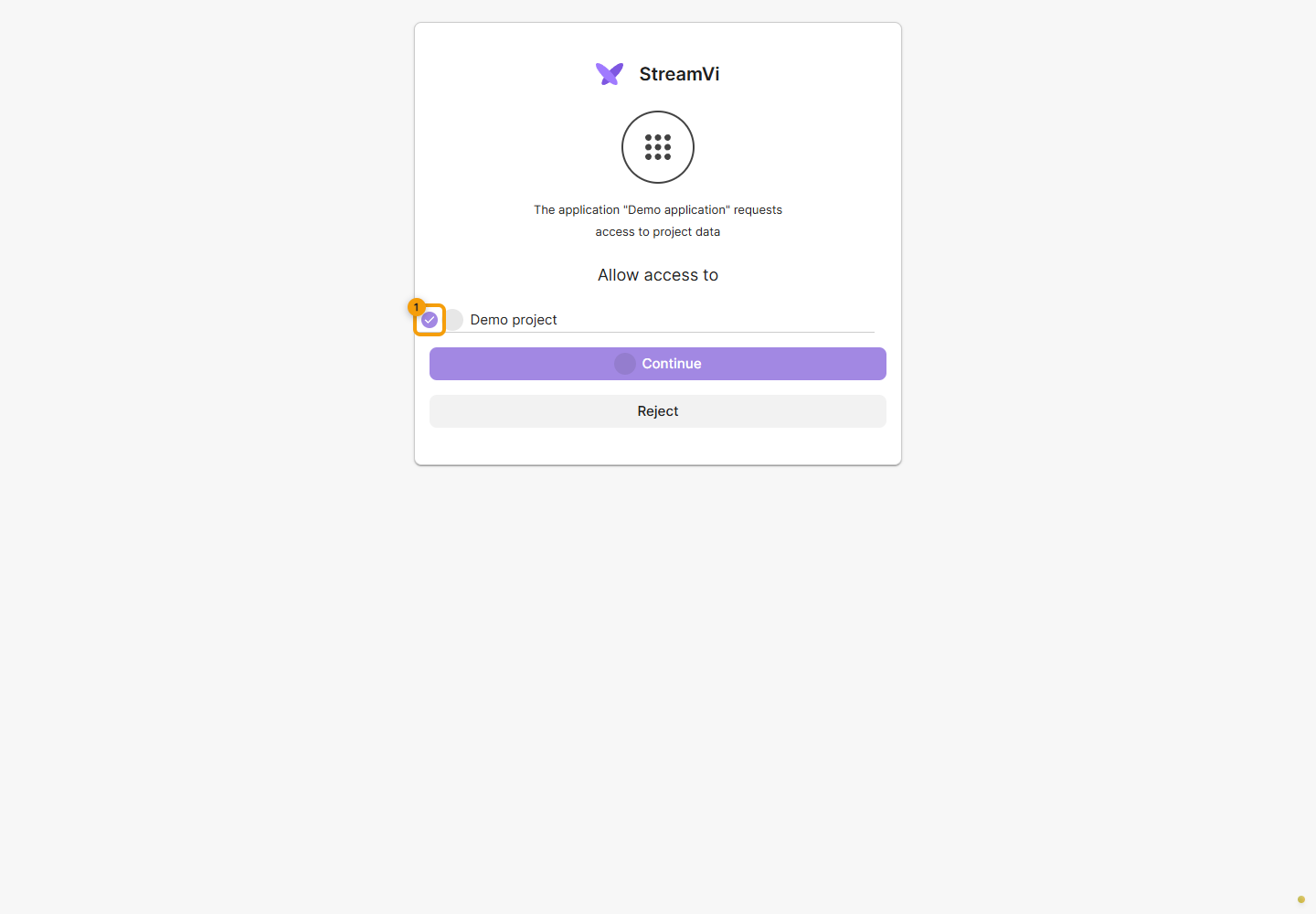
They then review the requested permissions and, if they agree, click Allow access. To decline, they click Reject. With a project supplied in the request, consent may appear immediately. Issued access is tied to the selected project and permissions.
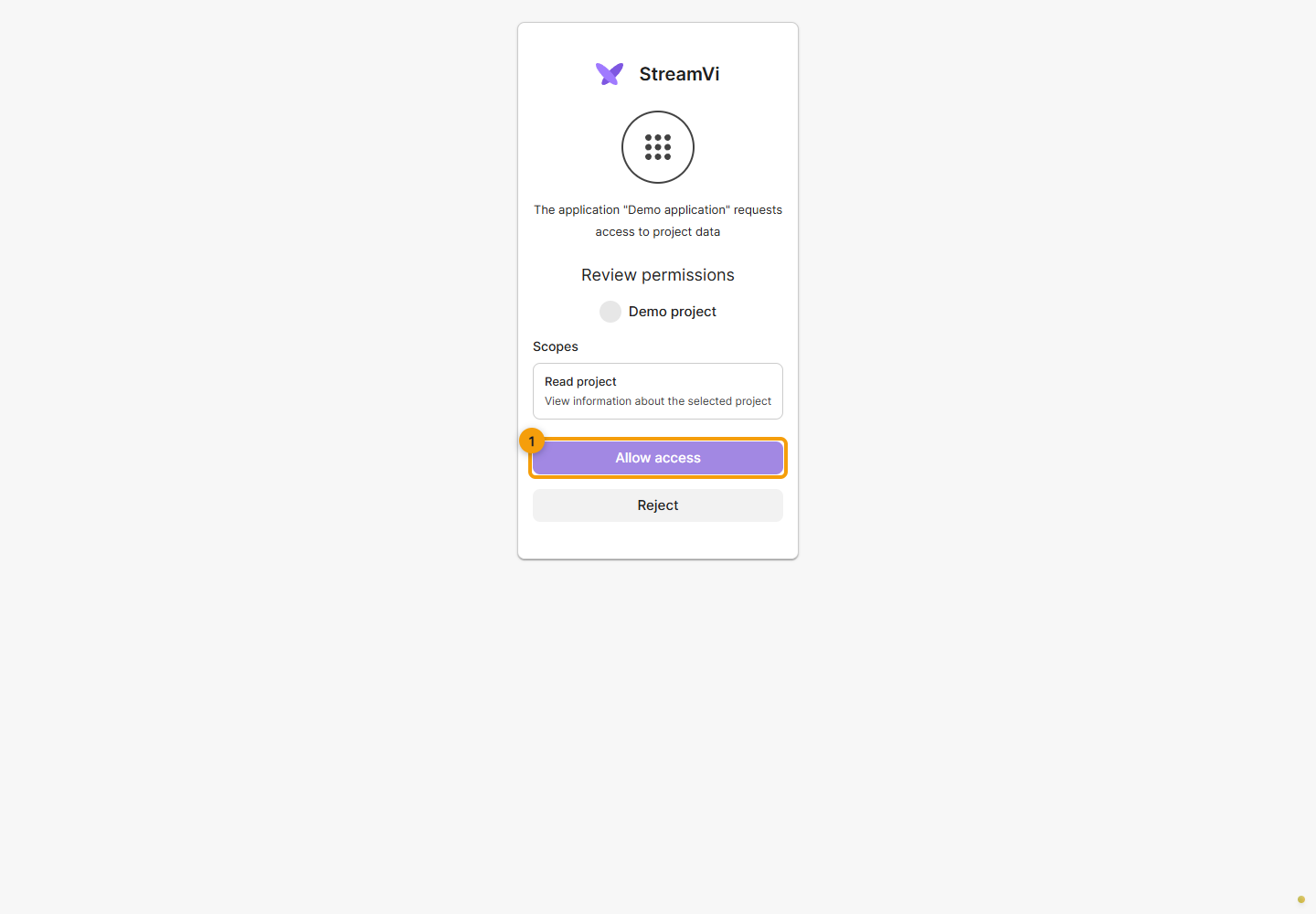
The screenshots show a demo application requesting project read access. Permissions depend on the application and its request; Allow grants access, so review the list before confirming.
When the request supplies no separate permission list, the Cabinet uses the application's configured permissions. Requests outside the application's allowed set are blocked. Authorization does not continue if permissions fail to load or the project is unavailable.
Obtain a token
After consent, the browser returns to redirect_uri with code and state. In the callback handler, retrieve the stored transaction from the same user's session and check state first. Your application performs this check. Do not exchange the code if the session is missing, state differs or the user declined.
Exchange the code through a server-side POST to https://api-v2.streamvi.io/site/oauth/token with an application/x-www-form-urlencoded body. This PKCE example sends grant_type=authorization_code, client_id, redirect_uri, code and the stored code_verifier.
async function finishOAuth(callbackUrl, transaction) {
  if (!transaction) throw new Error('OAuth session missing');
  const params = new URL(callbackUrl).searchParams;
  if (!params.get('state') || params.get('state') !== transaction.state) {
    throw new Error('OAuth state mismatch');
  }
  if (params.has('error')) throw new Error('OAuth authorization declined');
  const code = params.get('code');
  if (!code) throw new Error('OAuth code missing');

  const response = await fetch('https://api-v2.streamvi.io/site/oauth/token', {
    method: 'POST',
    headers: { 'Content-Type': 'application/x-www-form-urlencoded' },
    body: new URLSearchParams({
      grant_type: 'authorization_code',
      client_id: transaction.clientId,
      redirect_uri: transaction.redirectUri,
      code,
      code_verifier: transaction.codeVerifier,
    }),
  });
  const data = await response.json();
  if (!response.ok || typeof data.access_token !== 'string' || !data.access_token) {
    throw new Error('OAuth token request failed');
  }
  return data;
}
Remove transaction from the session while handling the callback so a repeated callback cannot start the same exchange. Start a new connection after an error. Store a successful exchange result on your server and associate it with your application's user and the selected StreamVi project.
Example response:
{
  "access_token": "ACCESS_TOKEN",
  "token_type": "Bearer",
  "scope": "project:read",
  "project_id": 12345,
  "project_external_id": "87654321"
}
The response's project_id is the internal numeric project ID; project_external_id is the external ID used in the authorization URL. The token is tied to the selected project. Sending another project_id in an API request does not switch projects and causes an access error.
First API request
To read the broadcast state, use GET /method/project/live-status with project:read. The STREAMVI_ACCESS_TOKEN variable below must contain the issued access_token.
curl --fail-with-body \
  'https://api-v2.streamvi.io/method/project/live-status?v=1' \
  --header "Authorization: Bearer $STREAMVI_ACCESS_TOKEN"
v=1 selects the method version. The token identifies the project, so this request needs no separate project_id. For other methods, use their required parameters and permissions from the API reference. Integration tokens are intended for /method/; Cabinet /site/ routes use the Cabinet's own authentication.
Reconnect
The current OAuth contract supports grant_type=authorization_code. Exchange through grant_type=refresh_token is not supported. If access stops working or you need to connect another project, repeat authorization and store the new token after user consent.
Check an integration
First verify reading accessible data in the intended project. Before a write request, separately check that the user granted the corresponding capability. Selecting the OAuth type alone does not grant permission to change or delete data.
On error, check the application ID, exact redirect URI match, project availability, permissions and whether code_verifier matches the original code_challenge. The user account and selected project must be active. For oauth2.insufficient_scope, check the method's required permission and the issued scope; for version.not_provided, supply the method version. An incoming stream key is not an API token.
Configure webhooks for incoming application events. See connecting a plugin to check the consent flow.